# About
Source: https://docs.legend.trade/
The competitive social trading platform
Legend is a social trading platform built on Hyperliquid. Trade perps, discover traders, copy positions, share market ideas, and track performance across trader, clan, and season rankings.
## Products
| Product | Description |
| -------------------------------------------------------------------------------- | -------------------------------------------------------------------------------------- |
| [Web Terminal](https://app.legend.trade) | Full-featured trading terminal with advanced charting, a social feed, and copy trading |
| [iOS App](https://apps.apple.com/us/app/legend-trade-anything/id6754900991) | Trade and follow markets on the go |
| [Android App](https://play.google.com/store/apps/details?id=trade.legend.legend) | The full Legend experience, on Google Play |
| [Telegram Bot](/telegram) | Trade, track positions, and compete from any chat |
| [Copy Trading](/copy-trading) | Mirror positions from top traders automatically or copy an individual trade |
| [Clans](/clans) | Team up, grow together, and unlock shared rewards |
| [Ranks](/ranks) | Compare traders, clans, and season performance |
| [Referrals](/rewards-and-points/referrals-and-rewards) | Earn up to 20% of referred users' fee revenue |
---
# What is Legend?
Source: https://docs.legend.trade/about/overview
A social trading platform built on Hyperliquid
**Legend** is a social trading platform built on Hyperliquid.
Legend brings onchain perps, trader profiles, performance rankings, clans, posts, live trading activity, and copy trading together. Discover friends, follow top traders, and improve with a public track record.
_Lock in and win on Legend._
The thesis behind Legend
Beginners, grinders, and creators
---
# Why are we building this?
Source: https://docs.legend.trade/about/why
The Legend Thesis
## Trading: The World's Biggest Video Game
Our core belief is that trading is the world's biggest video game. Millions of people log in to Hyperliquid, Robinhood, Coinbase, and other terminals every single day.
We're at an inflection point where any type of asset is becoming tradable. Ten years ago, the only instrument of leverage most people had access to was an option. Now, we have perps on almost anything -- mindshare, memecoins, prediction markets, and much more coming online.
Combine this with AI-driven displacement of traditional jobs, and you get a generation actively seeking alternative income streams. This is the underlying force pulling people into crypto.
**It creates a barbell in our generation and the next one.**
## The Hypergambling Barbell
| Traditional Jobs | Middle | New Economy |
| ---------------- | ------------------------------ | ---------------- |
| Plumbers | Displaced white-collar workers | Trading |
| Electricians | | Content Creation |
| Manual Labor | | Whop, pump.fun |
Recent data supports this barbell effect: [Gen Z men with college degrees now have the same unemployment rate as non-graduates](https://fortune.com/2025/07/22/gen-z-college-graduate-unemployment-level-same-as-nongrads-no-degree-job-premium/).
On the left, you have trades that are hard to automate -- plumbers, electricians, manual labor. In the middle, a growing segment of displaced workers. White-collar jobs are being automated even faster than blue-collar. On the right, people building alternative income streams -- trading, creating content, selling courses.
This dynamic has fueled explosive growth in platforms like **Axiom**, **Hyperliquid**, and **pump.fun**.
## Legend's Vision
Legend takes this megatrend to its logical extreme:
**The ultimate platform for traders to grind, discover and compete with others, and win every day.**
Legend is not another memecoin aggregation terminal. We are building a deeply opinionated product at the intersection of where we think this megatrend is heading.
**Trading, discovery, community, and market conversation -- all in one place.**
---
# Who is this for?
Source: https://docs.legend.trade/about/who
We built Legend for you.
**The founding team has been trading crypto for over seven years.**
_We've gone 1000x on our portfolios and negative 95% multiple times._
We are building the platform for millions of traders across equities, commodities, and crypto who want to **learn, trade, and improve** -- with leverage via perps, and the most assets possible.
## For beginners
You're new to trading or crypto and want a simple way to start with friends. You're looking for people to follow and don't know where to begin.
- Clean onboarding -- get trading in minutes
- Build a public track record and measure your progress
- Quick access to prices, charts, and simple buys/sells
- Rank up, make friends, and build your core group of traders
## For grinders
You log in daily, you care about winning, and you want to level up.
- Leaderboards and streaks to track your progress
- Fast access to perps with minimal friction
- Social context -- trade where your group already is
## For creators and communities
You run a group, publish research, or curate calls and want tight feedback loops.
- Calls, entries, and results all in one place
- Reputation via profiles, PnL, and stats
- Referral links and fee rewards to grow your community
- Enable copy trading so your community trades alongside you and shares upside
Legend is a place to trade, connect, and improve every day -- with your friends.
---
# Web app
Source: https://docs.legend.trade/platform/web
Legend on Desktop
Legend's web app is the full-featured trading terminal for active traders, with advanced charting, live market data, trader discovery, and copy trading.
Built on top of **Hyperliquid** via builder codes, giving traders access to deep liquidity and low-latency execution natively.
The web app brings trading, profiles, rankings, clans, social feeds, and copy trading together in one place.
Trade on the full web terminal at app.legend.trade
---
# iOS
Source: https://docs.legend.trade/platform/ios
Legend on iPhone
Trade anywhere with Legend on iOS. The mobile app gives you access to your positions, markets, trader profiles, social feed, and copy trading from your phone.
Available for iPhone. Get it on the App Store.
---
# Android
Source: https://docs.legend.trade/platform/android
Legend on Android
Trade anywhere with Legend on Android. The mobile app gives you access to your positions, markets, trader profiles, social feed, and copy trading from your phone.
Available for Android. Download it on Google Play.
---
# Legend on Telegram
Source: https://docs.legend.trade/telegram
Trade perps, track positions, set alerts, and compete -- all from Telegram
The Legend Telegram bot lets you trade directly from a chat. Open longs and shorts, manage orders, check your PnL, pull up charts, set price alerts, and climb group leaderboards -- solo in a DM or with friends in a group chat.
It runs on the **same Legend account and wallet** you use on the web and mobile apps. Nothing is a separate balance: a trade you place in Telegram shows up on the app instantly, and vice versa.
@legend_trade_bot -- start a chat and send `/start`.
## Connect your account
The bot recognizes you by linking your Telegram to your existing Legend account. This is a one-time setup.
If you don't have one yet, sign up at [app.legend.trade](https://app.legend.trade). Your trading
wallet is created automatically.
Open [@legend_trade_bot](https://t.me/legend_trade_bot) and send `/start`. Until you link, the
bot works in read-only mode -- you can look up traders and browse markets, but not trade.
In the Legend app, go to **Settings → Connected accounts → Telegram → Connect**. Telegram opens
an authorization prompt; approve it and you're returned to the app with your accounts linked.
Back in the bot, send `/start` again. It now shows your live snapshot -- equity, withdrawable
balance, and open positions -- and every trading command is unlocked.
Linking uses your existing Legend wallet -- the bot trades from your main account, signed securely
on Legend's servers. **No private keys are ever shared in chat.** Moving money out (`/withdraw`,
`/export`) is intentionally website-only.
## Fund your account
The bot spends from your main Legend wallet, so funding happens on the app once:
- **Deposit** on [app.legend.trade](https://app.legend.trade) (or the mobile app).
- In the bot, `/wallet` shows your deposit address and current balances at any time.
## Place your first trade
Every trading command works two ways: send it **bare** to be walked through step-by-step, or pass **arguments** to skip straight to the confirmation.
```
/long btc 5 100
```
That's a **5×** long on **BTC** with **$100** of margin -- the order is `TICKER LEVERAGE MARGIN`. Confirm it and you're in. Then:
- `/positions` -- see your open positions and unrealized PnL
- `/close btc` -- close it (append a percentage like `/close btc 50` to close half)
Prefer to be guided? Just send `/long` with no arguments and the bot will ask for the ticker,
leverage, and size one step at a time.
See the full list on the [Commands](/telegram/commands) page.
## Trade with friends
Add the bot to a group chat to turn trading into a competition:
- **Group leaderboard** -- `/leaderboard` ranks everyone in the chat by PnL over `1d`, `7d`, `30d`, or `all`.
- **Trade cards** -- when you trade, the bot posts a card of your fill to the shared group so everyone sees the action.
- **Referrals** -- invites sent from a group are attributed to the group, so you get credit for bringing traders in (`/invite`).
## Privacy & ghost mode
By default, your fills are broadcast as cards to the group chats you share with the bot. If you'd rather trade quietly, turn on **ghost mode** -- your trades stay private and are never posted.
- The bot asks once, during onboarding, whether you want ghost mode on.
- Change it anytime with `/settings`.
## Custody & safety
- The bot trades using your Legend **session signer** -- it can place, modify, and cancel orders, but it **cannot move your money**.
- **Withdrawals and private-key export are website-only**, by design (`/withdraw` and `/export` link you to the app).
- You can unlink Telegram at any time under **Settings → Connected accounts**.
The complete command reference -- trading, orders, charts, alerts, and social.
How market, limit, stop, take-profit, and TWAP orders work on Legend.
---
# Telegram commands
Source: https://docs.legend.trade/telegram/commands
Every command the Legend Telegram bot understands
This is the full command reference for [@legend_trade_bot](https://t.me/legend_trade_bot). New here? Start with [Legend on Telegram](/telegram) to connect your account first.
**Guided or one-line.** Most trading commands work either way. Send a command **bare** (e.g. `/long`) and the bot walks you through each step; pass **arguments** (e.g. `/long btc 5 100`) to skip straight to confirmation. Arguments in `[brackets]` are optional; `` are required.
## Account & wallet
| Command | Description |
| ----------- | ------------------------------------------------------------------------------------------ |
| `/start` | Your profile and a live account snapshot -- equity, withdrawable, open positions. |
| `/wallet` | Your deposit address and balances. |
| `/settings` | Bot settings -- toggle **ghost mode** (private trades) and **bypass trade confirmations**. |
| `/invite` | Your referral links and how many traders you've referred. |
| `/help` | Show the full command list inside the chat. |
## Trading
The order for opening a position is `TICKER LEVERAGE MARGIN`.
| Command | Syntax | Description |
| -------- | ------------------------------------- | --------------------------------------------------------------------------- |
| `/long` | `/long [symbol] [leverage] [size $]` | Open a long. Example: `/long btc 5 100` |
| `/short` | `/short [symbol] [leverage] [size $]` | Open a short. Example: `/short eth 10 250` |
| `/close` | `/close [symbol] [percent]` | Close a position -- defaults to 100%. Example: `/close btc 50` closes half. |
## Orders
| Command | Syntax | Description |
| ------------- | ----------------------------------------------------------------- | ---------------------------------------------------------------------------- |
| `/limit` | `/limit long\|short [iso\|cross]` | Resting limit entry. Example: `/limit long btc 5 60000 100` |
| `/stoploss` | `/stoploss [symbol] [price] [percent]` | Reduce-only stop loss on an open position. |
| `/takeprofit` | `/takeprofit [symbol] [price] [percent]` | Reduce-only take profit on an open position. |
| `/stoplimit` | `/stoplimit [symbol] [trigger] [limit] [percent]` | Stop that places a limit order when the trigger is hit. |
| `/takelimit` | `/takelimit [symbol] [trigger] [limit] [percent]` | Take-profit that places a limit order when the trigger is hit. |
| `/twap` | `/twap [long\|short] [symbol] [$size] [minutes]` | Split a large order into slices over time. Example: `/twap long btc $500 60` |
| `/orders` | `/orders` | View your open orders and cancel them with inline buttons. |
Not sure about an order type? See [Order Types](/trading/order-types) for how each one behaves.
## Positions & PnL
| Command | Syntax | Description |
| ------------ | -------------------- | ------------------------------------------------------------------ |
| `/positions` | `/positions [@user]` | Your open positions, or another trader's if you pass their handle. |
## Markets & charts
| Command | Syntax | Description |
| ---------- | ----------------------------------------- | ---------------------------------------------------------------- |
| `/markets` | `/markets` | Top markets and their 24h change. |
| `price` | `price ` | Quick price for a ticker. Example: `price mu` (no slash needed). |
| `/chart` | `/chart [interval] [indicators]` | A price chart. Also `/c` or just `lg`. |
**Chart options:** add indicators like `bb`, `sma50`, `ema20`, or `vwap` -- combine up to four:
```
lg btc 1h bb ema50
```
Compare two assets with a **ratio chart**:
```
lg btc/eth 1d
```
## Alerts
| Command | Syntax | Description |
| -------- | ------------------------- | ----------------------------------------------------------------------------------------------- |
| `/alert` | `/alert ` | One-shot price alert -- the bot messages you when the price is hit. Example: `/alert btc 70000` |
## Social & leaderboards
| Command | Syntax | Description |
| -------------- | ------------------------------------------ | ------------------------------------------------------------------------ |
| `/leaderboard` | `/leaderboard [1d\|7d\|30d\|all] [global]` | Group leaderboard by PnL. In a DM it defaults to the global leaderboard. |
| `/user` | `/user ` | Look up a trader's stats. |
| `/clan` | `/clan [name]` | Top clans, or look up a specific clan by name. |
## Moving funds
For your security, moving money is handled on the website -- these commands link you there.
| Command | Description |
| --------------------- | -------------------------------------------------- |
| `/withdraw` · `/send` | Withdraw or send funds -- opens the app. |
| `/export` | Export your wallet's private key -- opens the app. |
The bot can trade on your behalf but **cannot move your funds**. Withdrawals and key export always
happen on [app.legend.trade](https://app.legend.trade), never in chat.
---
# Trading
Source: https://docs.legend.trade/trading
Trading perpetual contracts on Legend
Legend is built on [Hyperliquid](https://hyperliquid.gitbook.io/hyperliquid-docs), a high-performance on-chain perpetuals exchange. All trades placed on Legend are executed directly on Hyperliquid's order book with the same deep liquidity and low-latency matching.
You can trade perpetual contracts (perps) on all assets available on Hyperliquid -- major crypto assets, memecoins, and more as listings are added.
## Margin Modes
Legend supports both margin modes available on Hyperliquid:
- **Cross margin** -- the default. Collateral is shared across all cross-margin positions, maximizing capital efficiency. A loss on one position can affect your entire account balance.
- **Isolated margin** -- collateral is locked to a single position. Losses are contained to the margin allocated to that position, but capital efficiency is lower.
You can set the margin mode per asset from the trade form.
For full details on margin mechanics, see [Hyperliquid's margining documentation](https://hyperliquid.gitbook.io/hyperliquid-docs/trading/margining).
## Leverage
Leverage can be adjusted per asset from 1x up to the maximum allowed for that asset. Higher leverage means less margin is required to open a position, but increases liquidation risk.
Maximum leverage varies by asset and is determined by Hyperliquid's [margin tiers](https://hyperliquid.gitbook.io/hyperliquid-docs/trading/margin-tiers).
## Account equity, available balance, and margin
A successful deposit can increase your account equity while your available balance remains zero. These amounts answer different questions:
| Amount | What it tells you |
| ------------------------- | ------------------------------------------------------------------------------------------------------------------------- |
| **Account equity** | The value supporting your positions, including unrealized profit or loss. |
| **Initial margin** | The collateral requirement at your selected leverage for opening or increasing positions. |
| **Available to trade** | Your remaining capacity to open or increase positions after applicable margin requirements and order reservations. |
| **Available to withdraw** | What can leave the account under Hyperliquid’s withdrawal and transfer rules. This can differ from your trading capacity. |
| **Maintenance margin** | The minimum equity required to keep existing positions open before liquidation. |
### Where does a deposit go when positions are open?
With cross margin, positions using the same collateral share a pool of funds. A deposit adds to that pool; it is not assigned dollar by dollar to a specific position. Unrealized losses can leave equity below the initial margin requirement, so a deposit may improve your liquidation buffer without freeing capacity for a new trade.
For isolated positions, collateral is allocated separately. A deposit into your account does not automatically add margin to an isolated position.
### Why can positions stay open with zero available balance?
Initial margin and maintenance margin are different thresholds. Initial margin governs opening or increasing positions. Maintenance margin governs liquidation of existing positions; it is not simply half the margin at your selected leverage.
Consider this **hypothetical cross-margin account**, with no open orders or isolated positions:
| Amount | Before deposit | After a \$100 deposit |
| ------------------------------------- | -------------- | --------------------- |
| Account equity | \$850 | \$950 |
| Initial margin requirement | \$1,000 | \$1,000 |
| Free initial margin for new positions | \$0 | \$0 |
| Maintenance margin requirement | \$100 | \$100 |
| Equity above maintenance margin | \$750 | \$850 |
The deposit increases equity, but equity remains below the initial margin requirement. Existing positions can remain open because equity is still above maintenance margin. The example assumes prices, positions, and requirements stay unchanged; actual values move with the market, and fees and funding also affect equity.
Zero available balance alone does not tell you how close you are to liquidation. Check your
positions and liquidation information. Withdrawable funds are also subject to separate transfer
rules, so do not treat free initial margin as a withdrawal quote.
For the underlying rules, see Hyperliquid’s [margin requirements](https://hyperliquid.gitbook.io/hyperliquid-docs/trading/margining) and [unified account collateral](https://hyperliquid.gitbook.io/hyperliquid-docs/trading/account-abstraction-modes).
## Liquidations
If your account equity falls below the maintenance margin requirement, your positions may be liquidated. Hyperliquid uses a two-stage liquidation process -- market orders are sent to the order book first, with a backstop liquidation mechanism as a fallback.
For full details, see [Hyperliquid's liquidation documentation](https://hyperliquid.gitbook.io/hyperliquid-docs/trading/liquidations).
## Funding Rates
Perpetual contracts use a funding rate mechanism to keep the contract price aligned with the spot index price. Funding is exchanged between long and short holders periodically.
For full details, see [Hyperliquid's funding documentation](https://hyperliquid.gitbook.io/hyperliquid-docs/trading/funding).
---
# Order types
Source: https://docs.legend.trade/trading/order-types
All order types available on Legend
Legend supports the full range of order types available on Hyperliquid. For additional details, see [Hyperliquid's order type documentation](https://hyperliquid.gitbook.io/hyperliquid-docs/trading/order-types).
## Market
Executes immediately at the current market price. Best for getting in or out of a position quickly when speed matters more than exact price.
A slippage buffer is automatically applied to protect against price movement between submission and execution.
## Limit
Executes at the specified limit price or better. The order rests on the order book until it is filled, canceled, or expires based on its time-in-force setting.
Limit orders give you precise control over your entry or exit price, but there is no guarantee of execution -- the market must reach your price.
## Stop Market
A market order that activates when the mark price reaches your trigger price. Commonly used as a stop loss to exit a position if the market moves against you.
- For longs, the trigger price is set **below** the current price
- For shorts, the trigger price is set **above** the current price
## Stop Limit
A limit order that activates when the mark price reaches your trigger price. Works like a stop market, but once triggered, places a limit order at your specified price instead of a market order.
Gives more price control than a stop market, but the limit order may not fill if the market moves quickly past your price.
## Take Profit Market
A market order that activates when the mark price reaches your take profit level. Used to automatically close a position and lock in profit at a target price.
- For longs, the trigger price is set **above** the current price
- For shorts, the trigger price is set **below** the current price
## Take Profit Limit
A limit order that activates when the mark price reaches your take profit level. Works like a take profit market, but places a limit order at your specified price once triggered.
## Scale
Places multiple limit orders distributed across a price range. Useful for building or exiting a position gradually at different price levels instead of placing a single large order.
**Parameters:**
- **Number of orders** -- how many individual limit orders to place
- **Min / Max price** -- the price range for the orders
- **Size skew** -- controls whether orders are equally sized or weighted toward one end of the range (default: equal)
Scale orders support all three [time-in-force](#time-in-force) options.
## TWAP
Time-Weighted Average Price. Splits a large order into smaller sub-orders executed at regular intervals (every 30 seconds) over a set duration. This reduces market impact by spreading execution over time.
**Parameters:**
- **Duration** -- the total execution window
- **Randomize** -- optionally randomize timing within the execution window
- **Trigger price** -- optionally wait until the market reaches a specified price before execution begins
- **Maximum / minimum price** -- optionally stop a buy TWAP above a maximum price or a sell TWAP below a minimum price
TWAP orders have a **\$100 minimum total notional** and can run from **5 minutes to 7 days**.
For full TWAP details, see [Hyperliquid's order type documentation](https://hyperliquid.gitbook.io/hyperliquid-docs/trading/order-types).
---
## Order Modifiers
### Time in Force
Time-in-force (TIF) controls how long an order remains active:
| Setting | Name | Behavior |
| ------- | ------------------- | --------------------------------------------------------------------------------------- |
| **GTC** | Good Til Cancel | Order rests on the book until filled or manually canceled. This is the default. |
| **IOC** | Immediate or Cancel | Any portion not immediately filled is canceled. |
| **ALO** | Add Liquidity Only | Post-only order -- rejected if it would immediately match. Guarantees maker fee/rebate. |
### Reduce Only
When enabled, the order can only reduce or close an existing position -- it will not open a new position or increase an existing one. Useful for ensuring a stop loss or take profit order doesn't accidentally flip your position.
### Take Profit / Stop Loss (TP/SL)
You can attach take profit and/or stop loss levels when placing a market or limit order. These create linked trigger orders that automatically close the position at your target profit or maximum loss.
- TP and SL are both optional -- you can set one or both
- You can set TP/SL as a fixed price or as a percentage from your entry
- TP/SL can also be managed on existing positions from the positions table
For full details on TP/SL mechanics, see [Hyperliquid's TP/SL documentation](https://hyperliquid.gitbook.io/hyperliquid-docs/trading/take-profit-and-stop-loss-orders-tp-sl).
### Trailing Stop
Automatically adjusts your stop price as the market moves in your favor. You set a trailing percentage -- the stop price follows the market by that percentage distance. If the market reverses by the trailing amount, a market close is triggered.
Trailing stop and stop loss are mutually exclusive -- setting one clears the other.
---
## Quick Reference
| Order Type | Rests on Book | Trigger Required | Best For |
| ----------- | ------------------- | ---------------- | ------------------------------------ |
| Market | No | No | Immediate execution |
| Limit | Yes | No | Precise entry/exit price |
| Stop Market | No | Yes | Stop loss protection |
| Stop Limit | Yes (after trigger) | Yes | Stop loss with price control |
| TP Market | No | Yes | Locking in profit |
| TP Limit | Yes (after trigger) | Yes | Locking in profit with price control |
| Scale | Yes | No | Gradual position building |
| TWAP | No (sub-orders) | No | Large orders with minimal impact |
---
# Ranks
Source: https://docs.legend.trade/ranks
Trader, clan, and season leaderboards
Ranks compares performance across traders, clans, and trading seasons. Open **Ranks** in Legend and choose the leaderboard that matches what you want to compare.
## Traders
The Traders leaderboard supports **24-hour**, **7-day**, **30-day**, and **all-time** views. You can search for a trader and sort the table by fields including profit, average ROI, volume, last activity, and copiers.
## Clans
The Clans leaderboard supports the same 24-hour, 7-day, 30-day, and all-time periods. A clan's canonical rank is based on total PnL. The table can also be sorted by clan name, member count, or total account value without changing that canonical PnL rank.
See [Clans](/clans) for membership rules and volume-based fee rewards.
## Seasons
Season leaderboards use fixed start and end dates and can provide weekly and final standings. Each season defines its own available performance tracks and qualification requirements; tracks may include PnL, ROI, and trading volume.
Season standings are calculated within the selected season or week.
---
# Social
Source: https://docs.legend.trade/social
Trading is better with friends
Social connects everything on the platform: who you follow, whose ideas you read, and who you trade alongside.
Your profile and performance are public, posts let you share market context, and live activity shows how traders are positioned.
- **Feed** -- read posts, chart notes, conversations, and daily recaps
- **Activity** -- follow trending positions and live trades across the platform
- **Clans** -- team up, share progress, and unlock rewards together
- **Following** -- track the traders you care about
- **Chat** -- talk to clanmates and friends directly on the platform
---
# Activity
Source: https://docs.legend.trade/activity
Trending positions and live trading activity
Activity shows trading behavior across Legend. It is separate from the [Feed](/feed), which contains posts, chart notes, replies, and market recaps.
## Trending Positions
The top of Activity highlights positions drawing attention across the platform.
- **Trending Positions** shows currently active positions
- **Greatest Hits** shows notable positions from the all-time view
Select a position to inspect its direction, performance, trader, and any attached notes, then jump to the relevant market.
## Live Trades
The trade stream shows recent entries, increases, reductions, and closes. Use the scope menu to choose which activity appears:
- **All** -- trades from across Legend
- **Following** -- trades from people you follow
- **Clan** -- trades from members of your clan
Select a trade to view its details and open the corresponding market.
---
# Feed
Source: https://docs.legend.trade/feed
Posts, chart notes, conversations, and market recaps
The Feed is where traders publish market ideas and discuss them. It is separate from [Activity](/activity), which shows trending positions and live trades.
Feed items can include:
- Posts and chart notes from traders
- Trading context attached to a position or symbol
- Replies and conversations
- Legend's daily market recap
Use the **All**, **Following**, and **Clan** filters to choose whose posts you see. Selecting a chart note opens its conversation alongside the relevant market chart when a symbol is attached.
---
# Clans
Source: https://docs.legend.trade/clans
Legend's team system
Clans are Legend's team system -- trade together, grow together.
Clans unlock fee rewards for everyone based on the clan's rolling 30-day Legend trading volume. Members receive a rebate on their own builder fees, while leaders receive the same rate as a share of other members' builder fees.
| Rolling 30-Day Clan Volume | Member Rebate | Leader Share |
| -------------------------- | ------------- | ------------ |
| Under \$100,000 | 0% | 0% |
| \$100,000+ | 1% | 1% |
| \$500,000+ | 2% | 2% |
| \$1,000,000+ | 3% | 3% |
| \$5,000,000+ | 4% | 4% |
| \$10,000,000+ | 5% | 5% |
Only current members' mainnet notional traded through Legend while they are in the clan counts. Entries and exits both contribute. When someone leaves, their volume no longer contributes to the clan's tier.
- To create a clan, you must have at least $1,000 in lifetime notional trading volume on Legend
- Capped at 300 members -- you can only be in one clan at a time
- Clan standing is ranked by total PnL, with 24-hour, 7-day, 30-day, and all-time views
- Each clan has its own chat, member list, and shared stats
- Invite friends or recruit from the leaderboard
Leaders receive the member rebate on their own trades, but they do not receive a leader share from themselves. Fees are charged normally, then earned rebates and leader shares accrue as claimable rewards.
Your clan is your identity on Legend -- who you ride with.
---
# Chat
Source: https://docs.legend.trade/chat
Talk to your clanmates and friends
Chat is built into Legend inside clans, in group chats, and between traders on the platform.
- **Clan chat** -- persistent group chat for your clan. Share calls and build together.
- **Direct messages** -- start a private conversation with another trader. Blocking and recipient privacy settings apply; a message may arrive as a request until it is accepted.
- **Group chats** -- private group conversations. Invitations can also require approval based on each recipient's privacy settings.
Chat is where Legend comes alive. Share trades, discuss markets, and stay connected to the people around you.
---
# Copy trading
Source: https://docs.legend.trade/copy-trading
Automatically mirror the trades of top traders on Legend
Copy trading lets you automatically mirror another trader's positions. When the trader you're copying opens, closes, or adjusts a position, the same action is reflected in your dedicated copy wallet -- proportionally scaled to your allocation.
This is the fastest way to follow a trader's strategy with real capital, without manually executing each trade yourself.
Learn how continuous position mirroring works, how orders are sized, and how to manage an active
copy.
Copy-trading allocations range from \$50 to \$100,000 per trader.
## How It Works
1. **Find a trader** -- Browse profiles on Legend. Any trader with open positions can be copied.
2. **Start copying** -- Click "Copy Trade" on their profile and choose how much to allocate, using the slider or by typing an amount. The funds move from your main trading balance into your copy wallet. If the trader charges a profit share, you'll see the rate before you confirm.
3. **Automatic mirroring** -- A dedicated sub-wallet holds your allocation for each trader you copy. When the target trader executes a trade, a proportional order is placed in your copy wallet immediately.
4. **Manage anytime** -- Add funds, withdraw part of your balance, or stop completely. When you stop copying, all mirrored positions are closed automatically and your remaining funds are returned to your main wallet.
## Copy Wallet
Each copy profile uses a **separate sub-wallet** on Hyperliquid. Copied positions remain isolated from positions in your main trading wallet; your main wallet is used only when you add funds to or withdraw funds from the copy wallet.
- Funds are isolated per trader -- copying Trader A and Trader B uses two separate wallets
- Your copy wallet balance = your allocation + any trading gains or losses
- Positions in your copy wallet are fully independent from your main trading positions
If a brand-new Hyperliquid sub-wallet has to be created for your copy, a one-time Hyperliquid
network fee of around \$1 may be deducted when the wallet is first activated. This is a
Hyperliquid fee, not a Legend charge -- and if you've copy traded before, Legend reuses a previous
copy wallet and no fee applies.
## Proportional Sizing
Orders are scaled based on the ratio of your copy wallet's balance to the target trader's account value.
**Example:** If the trader has \$100,000 in equity and you allocate \$500, you're mirroring at a 0.5% ratio. When they open a \$10,000 BTC long, your copy wallet opens a \$50 BTC long.
Your copy wallet mirrors the trader's leverage and margin mode (isolated or cross) exactly -- there's no separate leverage cap to choose. Because every position is scaled down to your allocation, your dollar risk stays proportional even when the trader runs high leverage.
## Profit Share
Some traders charge a **profit share** -- a cut of the gains they generate for you. The rate is set by the trader and shown on the copy screen before you confirm.
- It applies only to **winning** trades. If a copied position closes at a loss, no profit share is taken.
- It's charged automatically when a winning copied position closes -- the trader's cut is set aside in your copy wallet and paid out from there.
- The rate is **locked in when you start copying**. If the trader changes their rate later, your existing copy keeps the rate you agreed to.
- The maximum any trader can charge is **20%**.
- Many traders charge nothing -- the copy screen always shows the exact rate, or none.
## Trading Fees
Orders placed by the copy-trading service carry a **0.10% Legend builder fee**, in addition to Hyperliquid's applicable trading fee. This fee is separate from profit share: the builder fee applies when copied orders execute, while profit share applies only to gains from winning copied positions when the trader has enabled it.
## Pre-Existing Positions
By default, when you start copying a trader, their currently-open positions are **skipped** -- you'll only mirror trades they open after you start. This keeps you from entering a trade mid-way, for example ending up on the wrong side if the trader sells an existing long.
This is controlled by the **Only copy newly opened positions** toggle, which is on by default. If you'd rather also mirror the trader's current open positions, turn it off when you set up the copy.
With the toggle on, the trader's original stake in an asset is never mirrored -- if they later add to a pre-existing position, only the added portion is copied.
## Adding Funds & Withdrawing
You stay in control of your money the whole time:
- **Add funds** -- Top up an active copy anytime, as long as your total allocation stays within the \$50–\$100,000 range.
- **Withdraw part of your balance** -- Withdraw anytime, including gains if you're in profit. Your positions scale down proportionally to match the new balance. A partial withdrawal must leave at least \$50 in the copy.
- **Withdraw everything / stop** -- Withdrawing your full balance stops the copy: all mirrored positions are closed with market orders and your remaining funds are transferred back to your main wallet automatically.
## What Gets Copied
| Action | Copied? |
| ---------------------- | ------------------------------------------------------------- |
| New position opens | Yes -- proportionally sized |
| Position size increase | Yes |
| Position close | Yes |
| Partial close / reduce | Yes |
| Leverage & margin mode | Mirrored exactly -- your wallet matches the trader's settings |
| TP/SL orders | Not directly -- but closes are mirrored when they trigger |
## What Doesn't Get Copied
- **Very small trades** -- Orders below the copy engine's minimum executable notional are skipped.
Copy trading does not exclude an asset solely because its open interest is below a fixed threshold. Instead, the fleet-wide copied exposure to an asset is capped at 5% of that asset's open interest. New copied exposure is scaled down when needed to stay within the cap and skipped only when no capacity remains.
## Copying a Single Trade
Separate from automatic copy trading, you can also copy an **individual trade** you see on Legend. Trade posts in the feed include a copy option: pick how much of your balance to put in -- using the percent presets or a custom amount -- and the trade opens in your own account at the trader's leverage, with optional take-profit and stop-loss.
This is a one-time copy from your main balance: the position is yours from then on and won't follow the trader's later moves.
---
# Autocopy
Source: https://docs.legend.trade/copy-trading/autocopy
Automatically mirror a trader's positions
Autocopy continuously mirrors another trader's position changes in a dedicated copy wallet. When the trader opens, increases, reduces, or closes a position, Legend places a proportional order for you.
Unlike copying a single feed trade, Autocopy keeps following the trader until you stop it.
## Start Autocopy
1. Open the profile of the trader you want to copy.
2. Select **Copy Trade**.
3. Allocate between \$50 and \$100,000.
4. Review the trader's profit-share rate and whether existing positions should be copied.
5. Confirm to fund the dedicated copy wallet and begin mirroring.
Each trader you copy uses a separate Hyperliquid sub-wallet. Funds, positions, gains, and losses are isolated from your main trading wallet and from every other Autocopy profile.
## Proportional Sizing
Autocopy scales orders by the ratio between your copy wallet's value and the trader's account value.
For example, if a trader has \$100,000 in equity and you allocate \$1,000, your copy ratio is 1%. A new \$20,000 position from that trader produces an approximately \$200 position in your copy wallet.
The copy wallet mirrors the trader's direction, leverage, and margin mode. Actual fills can differ because of market movement, minimum order sizes, available liquidity, and fleet-wide exposure safeguards.
## Existing Positions
**Only copy newly opened positions** is enabled by default. With this setting on, positions the trader already held when Autocopy started are skipped. If the trader later adds to one of those positions, only the new portion is copied.
Turn the setting off during setup if you also want to mirror positions that are already open. This can enter a trade at a different price and stage than the trader, so review the positions before confirming.
## Profit Share
A trader can charge up to 20% of the profits generated by their copied trades. The exact rate is shown before you confirm and is locked for that Autocopy profile. Losing trades do not incur profit share.
## Trading Fees
Copy-wallet orders carry a **0.10% Legend builder fee**, plus Hyperliquid's applicable trading fee. This is separate from the trader's optional profit share.
## Manage or Stop
From an active Autocopy profile, you can:
- Add funds without exceeding the \$100,000 allocation limit
- Withdraw part of the wallet while leaving at least \$50 allocated
- Stop Autocopy and withdraw everything
Stopping closes every open copied position with market orders, returns the remaining USDC to your main wallet, and prevents further orders.
## Safeguards
- Orders below the engine's minimum executable notional are skipped.
- Total copied exposure to an asset is capped at 5% of that asset's open interest.
- New exposure is scaled down when needed to remain within the cap.
- Take-profit and stop-loss orders are not copied directly, but the resulting position reduction or close is mirrored when they execute for the trader.
See [Limits & Safeguards](/copy-trading/limits) for the complete limits and withdrawal behavior.
---
# Limits and safeguards
Source: https://docs.legend.trade/copy-trading/limits
Copy trading deposit limits, asset restrictions, and safety mechanisms
Copy trading includes several safeguards to protect copiers.
## Deposit Limits
| Limit | Value | Notes |
| ------------------ | --------- | ------------------- |
| Minimum allocation | \$50 | Per trader you copy |
| Maximum allocation | \$100,000 | Per trader you copy |
These limits apply to the total allocation per copy profile -- your initial amount plus any funds you add later must stay within the range. If you're copying 3 different traders, each profile has its own \$50–\$100,000 range.
Partial withdrawals must leave at least \$50 in the profile; otherwise withdraw everything, which stops the copy.
If a brand-new Hyperliquid sub-wallet has to be created for your copy, a one-time Hyperliquid
network fee of around \$1 may be deducted when the wallet is activated. If you've copy traded
before, Legend reuses a previous copy wallet and no fee applies.
## Order Limits
| Limit | Value |
| --------------------------- | --------------------- |
| Minimum executable notional | Approximately \$11.41 |
If a proportional order falls below the engine's minimum executable notional, it is skipped. The current threshold is approximately \$11.41 and includes a safety buffer above Hyperliquid's minimum. This can happen when copying a trader with a much larger account -- very small percentage moves may not meet the minimum.
## Leverage
Your copy wallet mirrors the trader's leverage and margin mode (isolated or cross) exactly -- there's no separate leverage cap to set. Risk is controlled by your allocation size, since every position is scaled down proportionally to the amount you allocated.
## Profit Share
Traders can charge a profit share of up to **20%** on the gains they generate for you. The rate is shown before you start copying and locked in at that point -- a later rate change by the trader doesn't affect your existing copy.
It applies only to winning trades and is charged when a winning copied position closes. Positions that close at a loss incur no profit share.
## Trading Fees
Orders executed from a copy wallet carry a **0.10% Legend builder fee**, in addition to Hyperliquid's applicable trading fee. The builder fee is charged on copied order execution and is separate from any profit share charged on winning copied positions.
## Asset Restrictions
To limit fleet-wide concentration, total copy trading exposure to any one asset is capped at 5% of its open interest. An asset is not excluded solely because it is below a fixed open-interest threshold. If copiers would collectively exceed the cap, new copied exposure is scaled down to fit or skipped when no capacity remains.
These restrictions are evaluated in real-time for each order.
## Pre-Existing Positions
By default, a trader's already-open positions are **not mirrored** when you start copying. This prevents you from entering a trade mid-way -- for example, being on the wrong side if the trader sells an existing long. The trader's original stake in an asset is never copied; if they add to a pre-existing position after you start, only the added portion is mirrored proportionally.
This is the **Only copy newly opened positions** toggle, on by default. Turn it off at setup if you'd rather also mirror the trader's current open positions.
## Withdrawing Funds
You can withdraw from an active copy at any time:
1. **Partial withdrawals** are checked against your copy wallet's live value -- if you're in profit, you can withdraw gains too. Your positions scale down proportionally after the withdrawal. The amount must leave at least \$50 in the profile.
2. **Withdrawing everything** stops the copy (see below).
Withdrawals are sent back to your main wallet automatically. If most of your balance is deployed in open positions, the transfer completes as soon as the funds are freed up.
## Stopping a Copy Profile
When you stop copying a trader:
1. All open positions in your copy wallet are **closed with market orders**
2. After positions settle, your remaining USDC is **automatically transferred back** to your main wallet
3. The profile is marked as stopped -- no further orders will be placed
---
# Legend Capital
Source: https://docs.legend.trade/capital
Evaluation rules, funded accounts, leverage limits, and profit withdrawals
[Legend Capital](https://app.legend.trade/capital) is a one-step trading evaluation that unlocks a funded account with profit payouts. Both evaluation and funded trading use simulated balances. Eligible funded profits are paid to your Legend wallet in USDC; the account’s starting capital is not withdrawable.
## Account names
Legend Capital has two programs: Classic and Flex. An Eval is the evaluation phase. Pass the evaluation to start the Funded phase. Both phases use simulated trading balances.
| Program | Evaluation account | Account after passing |
| ------- | ------------------ | --------------------- |
| Classic | Classic Eval | Classic Funded |
| Flex | Flex Eval | Flex Funded |
Rookie, Prime, and Legend identify the account size. Classic and Flex identify the program. Each account keeps the program and rules saved at purchase.
History uses short labels such as `25k Classic Eval` and `5k Flex Eval`. The number is the starting balance in thousands of USDC.
## Classic Eval
The Capital selection screen features these account sizes. The fees below are the default one-time evaluation fees:
| Program | Account size | Default fee |
| ------- | -----------: | ----------: |
| Rookie | \$5,000 | \$60 |
| Prime | \$10,000 | \$110 |
| Legend | \$25,000 | \$275 |
Classic Eval rules:
| Rule | Default |
| -------------------------------- | --------------------------------------------------- |
| Profit target | 10% above the starting balance |
| Daily loss limit | 3% of the day-start realized balance |
| Max loss limit | 6% below the original starting balance, static |
| Time limit | None |
| Trader’s share of funded profits | 80% |
| Active accounts | Up to five evaluations and funded accounts combined |
Review the program, price, loss limits, target, and profit split shown at checkout before paying.
Your account dashboard shows the exact rules that apply to your account.
Reach the profit target while staying above both loss limits to pass. For a \$10,000 account with a 10% target, the target equity is \$11,000. Equity includes unrealized profit and loss on open positions, so loss limits can be breached before a position closes.
## Classic loss limits
Both limits apply during evaluation and funded trading. Reaching or falling below either limit fails the account. Trading stops and open positions are closed. A failed account does not resume at the next daily reset; you must purchase a new evaluation to start again.
### Daily loss limit
Classic accounts use the realized balance at each **daily reset** to calculate the daily loss limit. The Capital page shows the reset time in your local time zone:
**Daily loss limit = day-start balance − (day-start balance × daily loss percentage).**
Balance includes realized trading profit or loss, fees, and funding payments. It includes capital held as margin in positions and orders. It excludes unrealized profit or loss on open positions. Equity includes that unrealized profit or loss, and the breach check uses equity.
For a \$10,000 balance with a 3% daily loss percentage, you can lose \$300 and the daily loss limit is \$9,700. If the day starts with a realized balance of \$10,300, you can lose \$309 and the daily loss limit is \$9,991. Intraday profits do not move this daily loss limit upward.
#### Balance and equity
**Equity = balance + unrealized profit or loss.**
Margin is capital held for a position or order. Using capital as margin does not remove it from your account balance. Balance is not the same as free cash that you can use for another order.
The examples below exclude fees and funding payments to keep the calculations simple. Actual fees and funding payments change your balance.
#### Example 1: all capital held as BTC margin
You have a \$10,000 balance and use all of it as margin for a BTC position. Your free cash is \$0, but your balance is still \$10,000.
| BTC unrealized profit or loss | Balance | Equity |
| ----------------------------- | -------- | -------- |
| \$0 | \$10,000 | \$10,000 |
| +\$500 | \$10,000 | \$10,500 |
| −\$200 | \$10,000 | \$9,800 |
| −\$300 | \$10,000 | \$9,700 |
At the daily reset, the \$10,000 balance sets a 3% daily loss amount of \$300 and a daily loss limit of \$9,700. Unrealized profit at the reset does not raise this reference. If equity later reaches \$9,700, the account fails even if the BTC position is still open.
#### Example 2: a closed trade changes the next day’s reference
You close a trade with a \$300 profit. Your balance increases from \$10,000 to \$10,300. This does not move the current daily loss limit upward.
If that balance remains \$10,300 at the next daily reset, the new daily loss amount is **\$10,300 x 3% = \$309**. The new daily loss limit is **\$10,300 − \$309 = \$9,991**.
A \$300 unrealized profit on an open trade does not increase balance. If balance is still \$10,000 at the daily reset, the next daily loss limit remains \$9,700.
#### Example 3: the daily limit can fail an account before the overall limit
A \$10,000 account has a \$9,700 daily loss limit and a \$9,400 static max loss limit. If equity falls to \$9,700, it breaches the daily loss limit. The account fails even though equity is still above \$9,400.
The next daily reset does not restore a failed account. The two loss limits apply independently.
### Static max loss limit
**Static max loss limit = original starting balance × (1 − max loss percentage).**
The 6% max loss limit stays fixed at \$4,700 for Rookie, \$9,400 for Prime, or \$23,500 for Legend. Profits do not raise this limit, withdrawals do not lower it, and the daily reset does not change it. For example, a \$10,000 account that grows to \$10,800 still has a \$9,400 max loss limit. The daily loss limit still applies separately.
You must remain above both loss limits. The higher limit is the first limit you would hit as
equity falls. Use the current risk figures in your Capital dashboard to track how much more you
can lose.
## Markets, leverage, and trading costs
Leverage caps apply in both phases:
| Market | Maximum leverage |
| ----------------------------------------------------------------------- | ---------------: |
| BTC and ETH | 5x |
| HIP-3 builder markets, including equities, indices, commodities, and FX | 4x |
| Other native crypto perpetuals | 2x |
Some markets may be unavailable or have lower leverage limits. Follow the available markets, margin mode, and limits shown in your Capital account.
Available order types are shown in the trading interface. Stop orders do not replace your responsibility to stay above both loss limits.
Trading fees reduce your equity and progress toward the target. All Capital evaluation and funded accounts pay exchange fees only, with no Legend builder fee or volume discounts. For native perpetuals, the fee is 0.015% for maker fills and 0.045% for taker fills. HIP-3 exchange fees vary by market. Slippage can also change your execution price.
## Classic Funded
A passed Classic Eval becomes a Classic Funded account.
Your account moves into the funded phase. Open evaluation positions are closed, and the trading balance and loss limits reset to the original account size. Evaluation profits do not carry into the funded balance or become withdrawable.
Classic Funded accounts keep the same 3% daily loss limit and 6% static max loss limit. There is no further profit target. You receive 80% of eligible profits, and Legend retains 20%.
## Classic Funded payouts
Request a payout from your Capital dashboard after closing all open positions. Only eligible profit above the original starting balance is available. Profit reserved for an unresolved payout cannot be requested again.
- **Rolling cap:** up to \$5,000 of gross profit per trader across accounts in any rolling 24 hours. This is measured before the profit split, not by the USDC you receive, and does not reset at midnight.
- **Partial withdrawals:** you can choose an amount of at least \$10 in gross profit, within your available profit and remaining allowance.
- **One pending payout per account:** wait for an existing request to resolve before requesting another.
- **Trading pause:** trading is frozen while a payout is requested or processing. Follow its status and history in the dashboard.
For example, withdrawing \$1,000 of gross profit at an 80% split pays you \$800 USDC and uses \$1,000 of the rolling allowance.
When a payout completes, the full gross amount is removed from the simulated trading balance. The daily loss limit is adjusted for the withdrawal. The max loss limit stays fixed relative to the original starting balance. Withdrawing profits reduces the balance above that limit. Check the risk figures before you trade again.
### Withdraw and close
You can withdraw the remaining eligible profit and permanently close the funded account. Close all positions first. The entire remaining gross profit must fit within your rolling allowance; otherwise, withdraw within the cap and close later when the remainder fits. The \$10 partial-withdrawal minimum does not apply to this final payout.
Closing an account with no eligible profit simply settles it without a payout. A settled account can no longer trade.
## Flex Eval
Flex is a separate program. It does not change the rules for Classic accounts. The account dashboard shows the rules that apply to each account.
| Account size | Entry fee | Reset fee | Trader profit share |
| -----------: | --------: | --------: | ------------------: |
| \$5,000 | \$13 | \$9 | 90% |
| \$10,000 | \$26 | \$18 | 90% |
| \$25,000 | \$65 | \$45 | 90% |
Coupons can reduce evaluation fees. They do not reduce reset fees unless the coupon explicitly applies to resets. A coupon can be restricted to an allowlist of users and can set a per-user redemption limit. A restricted coupon is not available when its allowlist is empty.
### Evaluation and loss limits
The profit target is 5% of the starting balance. The max loss limit starts 4% below the starting balance. Flex uses an end-of-day trailing max loss limit. The limit starts at 96% of the starting balance. At each daily reset, the limit can rise from the end-of-day peak balance. It cannot rise above 100.4% of the starting balance. The limit cannot move down, including after a payout.
After the first completed payout, the max loss limit rises to 100.4% of the starting balance if it is lower. For a \$25,000 Flex account, this is \$25,100.
The soft daily loss limit is 2.4% of the day-start balance. Equity includes unrealized profit or loss. If equity reaches this limit, Flex locks the account until the next daily reset. This daily limit does not fail the account. The max loss limit still fails the account if equity reaches it. During a lockout, you can reduce positions, cancel orders, and change leverage. You cannot increase exposure.
Flex also has a 40% consistency rule. To pass, the best evaluation day must be no more than 40% of total evaluation profit. The current day's profit counts when the system checks the rule.
For example, a \$10,000 account has a \$500 profit target. A best day of \$200 is 40% of \$500, so it meets the consistency rule when the account reaches the target. A best day of \$300 is 60% of \$500, so the account must earn more total profit before it can pass.
You can buy one reset for a failed Flex account. You must buy the same account size within 30 days of failure. The account must belong to you, and it must not have a prior reset.
### Flex Funded
A passed Flex Eval becomes a Flex Funded account. The funded phase starts with the original account balance.
The funded account needs five profitable days before each payout. Each day must make at least 0.4% of the starting balance. This is \$20 for \$5,000, \$40 for \$10,000, and \$100 for \$25,000. A payout request must be at least 2% of the starting balance: \$100, \$200, or \$500 for the three account sizes.
The maximum gross amount for one request is the lowest of:
- 50% of available gross profit;
- 4% of the starting balance; and
- the unused part of the rolling \$5,000 payout limit.
The trader receives 90% of the gross payout. The platform receives 10%. An account can receive up to five payouts. The fifth completed payout settles the account.
For example, a \$10,000 account with \$800 of available gross profit has a maximum request of \$400: 50% of \$800 is \$400, and 4% of the starting balance is also \$400. The trader receives \$360. The \$200 minimum is met. If available gross profit is \$300, the maximum is \$150, which is below the \$200 minimum. The account cannot request a payout yet.
The daily reset starts each new day. Daily profit is current equity minus the previous day-start equity, plus gross payouts completed that day. This includes unrealized profit or loss. Use the starting balance as the reference when a phase starts that day. The funded phase starts a new daily-profit count at funding. A payout does not lower or unlock the max loss limit.
The payout-cycle net profit must be above \$0 before each payout. The cycle starts at funding or after the last completed payout. It is the sum of recorded daily profit and loss after the cycle starts, plus current equity minus today's day-start equity. This includes the current day and does not add payouts back to today's profit.
### Worked examples
**End-of-day max loss limit and lockout.** A \$10,000 account starts with a \$9,600 max loss limit. If its end-of-day peak balance reaches \$10,100, the next reset raises the limit to \$9,700. The limit cannot rise above \$10,040. With a \$10,000 day-start balance, the soft daily loss limit is \$9,760. Equity at \$9,760 locks the account until reset. Equity at or below the \$9,700 max loss limit fails the account.
**Profitable day.** If day-start equity is \$10,000, current equity is \$10,030, and a \$10 gross payout completes that day, daily profit is \$40. This meets the \$40 profitable-day requirement for a \$10,000 account.
**Payout and close-out.** A \$10,000 account with five profitable days and \$800 of available gross profit can request up to \$400. If you close the account, Flex pays that \$400 and settles the account. The other \$400 is forfeited. After four completed payouts, the next eligible payout is the fifth; it settles the account, and no sixth payout is available. If the payout gates do not pass when you close the account—for example, if cycle net profit is \$0 or less—Flex settles it without a payout and forfeits the available profit.
**Reset.** You can reset a failed \$10,000 Flex account once. You must own the account and buy the same challenge within 30 days of failure. The reset fee is \$18. You cannot reset the new account again.
---
# Referrals and rewards
Source: https://docs.legend.trade/rewards-and-points/referrals-and-rewards
Earn by growing Legend
Every Legend user gets a unique referral link (reflink). When someone signs up through your link, you earn **10%** of the eligible Legend builder fees they generate. Your referral rate can increase to **20%** based on your rolling 30-day Legend trading volume.
## How It Works
1. **Share your reflink** -- find it in your profile
2. **They sign up and trade** -- your referral is tracked automatically
3. **You earn** -- a share of their Legend builder fees accrues in your claimable Rewards balance
## Clan Tiers
Every clan unlocks one shared fee-reward rate from its rolling 30-day eligible volume:
| Rolling 30-Day Clan Volume | Member Rebate | Leader Share |
| -------------------------- | ------------- | ------------ |
| Under \$100,000 | 0% | 0% |
| \$100,000+ | 1% | 1% |
| \$500,000+ | 2% | 2% |
| \$1,000,000+ | 3% | 3% |
| \$5,000,000+ | 4% | 4% |
| \$10,000,000+ | 5% | 5% |
Members earn the rate as a rebate on their own builder fees. Leaders earn the same rate as a share of other members' builder fees and also receive the member rebate on their own trades.
## Base Rate
By default, you earn **10%** of the eligible Legend builder fees generated by your referred users.
## Bonus Tiers
Trade on Legend to unlock higher referral rates:
| Rolling 30-Day Volume | Referral Rate |
| --------------------- | ------------- |
| Base | 10% |
| \$100,000\+ | 12.5% |
| \$1,000,000\+ | 15% |
| \$10,000,000\+ | 17.5% |
| \$100,000,000\+ | 20% |
Your tier is based on your own executed mainnet notional traded through Legend during the trailing 30 days. Entries and exits both count toward volume. Deposits, withdrawals, transfers, paper trades, and trades made through another app do not count. Tiers are recalculated automatically and may decrease as older trades leave the rolling window.
Referral rewards and clan leader shares are separate streams. If you have a **20% referral rate** and your clan has unlocked a **5% leader share**, you may receive up to **25% of builder fees** from another trader who is both your referral and a member of your clan.
## Referred Trader Cashback
Traders who sign up through a referral link receive **10% cashback** on Legend builder fees paid on fills associated with a closed losing position.
Fees are charged normally when trades execute. Eligible cashback accrues in the trader's claimable Rewards balance after the losing position closes.
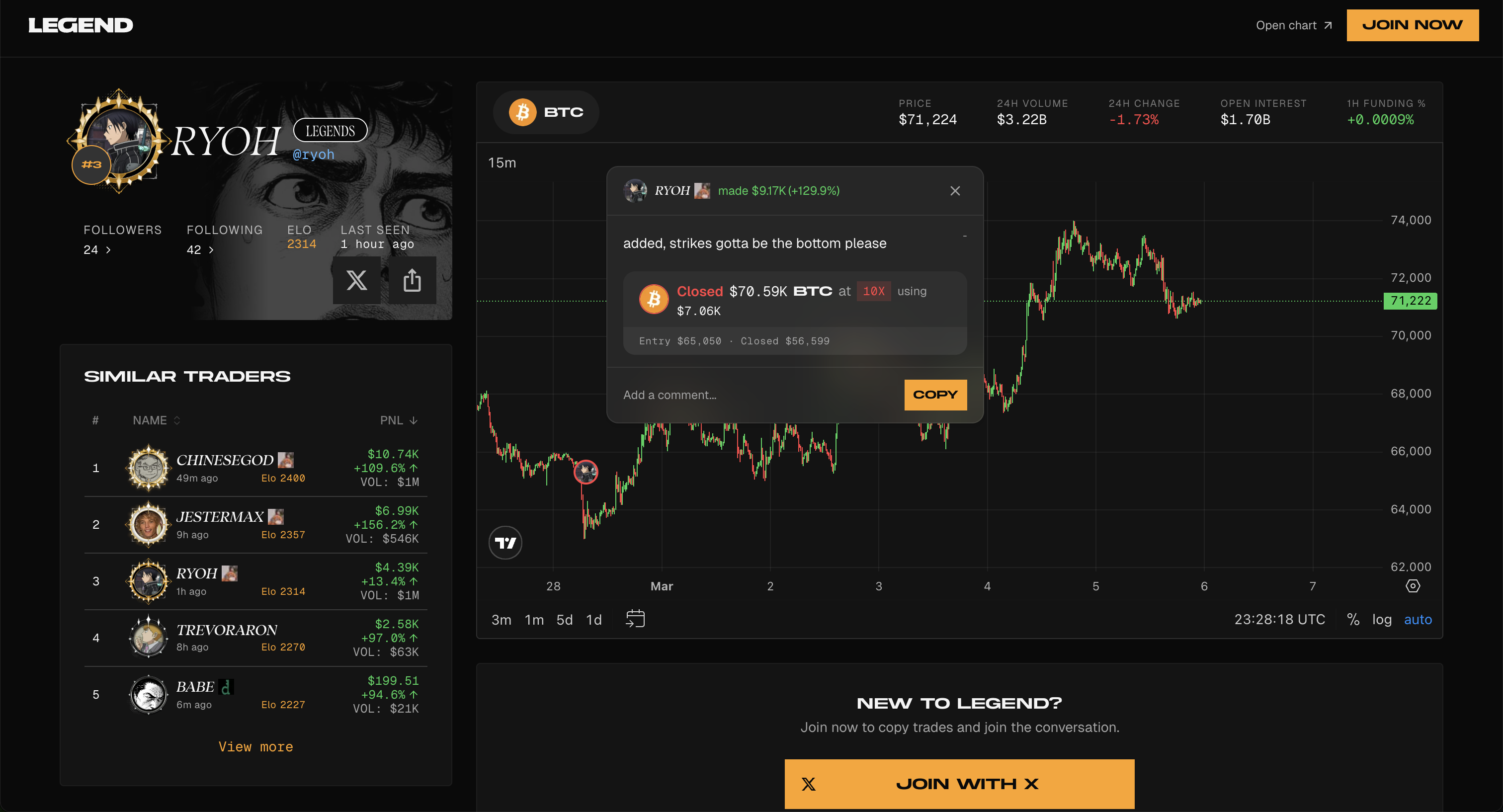
**External Chart Notes**
Sharing chart notes and feed items externally also counts as referrals. Anyone who signs up through a shared note or feed link is automatically tracked as your referral.
- Example link: [https://app.legend.trade/note/5ca6c978-5877-4060-b7bd-8a7f33a37dda](https://app.legend.trade/note/5ca6c978-5877-4060-b7bd-8a7f33a37dda)
## Clan Rewards
Clan rewards benefit members and leaders mutually. The clan's rolling 30-day eligible volume determines one shared rate from 0% to 5%.
- Members receive the unlocked rate as a rebate on their own Legend builder fees
- Leaders receive the same rate as a share of other members' Legend builder fees
- Leaders receive the member rebate on their own trades, but no self leader share
- Only current members' mainnet notional traded through Legend while in the clan counts toward the tier
- Entries and exits count; deposits, withdrawals, transfers, paper trades, and trades through another app do not
- Fees are charged normally, and clan rebates and leader shares accrue as rewards claimable from your profile
- If a member has a manually granted fee rebate, it does not stack with the clan rebate; the higher rate applies
To create a clan, you need at least $1,000 in lifetime notional trading volume on Legend. See
[Clans](/clans) for more details.
## Claiming Rewards
Referral rewards, clan rewards, eligible fee rebates, and referred-trader cashback are combined in your claimable Rewards balance.
Selecting **Claim** claims your full available balance. The minimum claim is **$10**, and successful claims are paid in USDC to your primary Legend wallet.
---
# Fees
Source: https://docs.legend.trade/about/fees
Trading fees on Legend
This page describes fees for real-money trading. [Capital evaluation and funded accounts](/capital) pay exchange fees only, with no Legend builder fee or volume discounts.
Legend trades are executed on [Hyperliquid](https://hyperliquid.xyz). Your total fee on each trade has two parts: the **Hyperliquid trading fee** and the **Legend platform fee**.
## Hyperliquid Trading Fees
Hyperliquid charges maker/taker fees based on your rolling 14-day weighted volume and HYPE staking tier. Perpetual and spot volume share one volume tier, with spot volume weighted double. Sub-account volume counts toward the master account, and all sub-accounts share the same tier.
Hyperliquid controls this external fee schedule and may change it independently of Legend. See [Hyperliquid's current fee documentation](https://hyperliquid.gitbook.io/hyperliquid-docs/trading/fees) for live perpetual, spot, staking-discount, and maker-rebate rates.
## Legend Platform Fee
A platform fee (builder code fee) is charged on every trade placed through Legend, on top of the Hyperliquid trading fee:
| Market | Platform Fee |
| ----------------------- | ------------ |
| Perpetuals | 0.05% |
| Copy-trading perpetuals | 0.10% |
A portion of this fee funds [referral payouts, clan member rebates, and clan leader shares](/rewards-and-points/referrals-and-rewards).
Copy-wallet orders use a separate 0.10% Legend builder fee because they are executed by the copy-trading service. This is separate from any profit-share rate set by the trader you copy.
Clan fee rewards do not reduce the fee charged when a trade executes. Eligible member rebates and leader shares accrue separately as claimable rewards.
## Total Fee
Your total fee per trade is the sum of both components:
**Total fee** = Hyperliquid trading fee + Legend platform fee
Your actual Hyperliquid component depends on your current volume and staking tier. The order interface displays the applicable fee before submission.
## Referred User Cashback
Users who signed up through a referral link earn **10% cashback** on Legend platform fees from losing trades. This cashback accrues automatically and can be claimed from the Rewards section in your profile.
For the complete Hyperliquid fee schedule including staking discounts and additional details, see
[Hyperliquid's fee documentation](https://hyperliquid.gitbook.io/hyperliquid-docs/trading/fees).
---
# FAQ
Source: https://docs.legend.trade/faq
Frequently asked questions about Legend
## General
Legend is a competitive social trading platform built on top of Hyperliquid. Hyperliquid is the underlying exchange -- it provides the liquidity, order matching, and on-chain settlement. Legend adds trader profiles, leaderboards, clans, copy trading, chat, and a social feed.
TLDR: Hyperliquid is the engine. Legend is the experience built on top of it.
You can trade perpetual contracts (perps) on all assets available on Hyperliquid. This includes
major crypto assets, memecoins, and more as Hyperliquid continues to add listings.
You can sign up with **Google**, **X (Twitter)**, **Telegram**, **email**, a **passkey**, or by
connecting an existing wallet. Legend uses Privy to create a non-custodial embedded wallet for you
automatically.
Yes. Legend is available on iOS via the [App
Store](https://apps.apple.com/us/app/legend-trade-anything/id6754900991), on Android via [Google
Play](https://play.google.com/store/apps/details?id=trade.legend.legend), and in any mobile
browser at [app.legend.trade](https://app.legend.trade).
User-managed trading subaccounts are not currently supported. Connected login and social accounts are managed separately in Settings.
---
## Deposits & Withdrawals
Select **Deposit** in Legend to open the Unifold funding flow. Unifold presents the funding methods available for your location and routes the deposit to your Hyperliquid address on HyperCore.
Wait 5-10 minutes for the transaction to confirm and bridge. If it still hasn't arrived, verify
that you deposited a supported token on a supported network. If the issue persists, reach out to
us on [X (Twitter)](https://x.com/legendtrade) for help.
A confirmed deposit increases your balance, but it may not leave funds available to trade or withdraw. With cross margin, your deposit joins the shared collateral supporting your existing positions. Unrealized losses and margin reserved for positions or open orders can leave no capacity for another trade.
For example, suppose your account equity is **\$850** and your existing positions require **\$1,000** in initial margin. A **\$100** deposit raises equity to **\$950**, so there is still no free initial margin for a new position. These numbers are hypothetical and assume prices and positions stay unchanged.
**Zero available balance does not mean liquidation.** Existing positions can remain open while equity is above the separate, lower maintenance margin requirement. Also, the amount available to trade can differ from the amount available to withdraw.
See [Account equity, available balance, and margin](/trading#account-equity-available-balance-and-margin) for a breakdown. If the deposit itself is missing from your transaction history, follow the deposit troubleshooting answer above.
Withdrawals are processed via Unifold. Initiate a withdrawal from the Legend app and choose your
destination chain and currency -- Unifold supports withdrawing to many chains and currencies for
maximum convenience.
Withdrawals typically complete within a few minutes. If yours appears stuck, message us on [X (Twitter)](https://x.com/legendtrade) with your wallet address and we'll help resolve it.
---
## Referrals & Rewards
Every Legend user gets a unique referral link. When someone signs up through your link and trades, you earn a percentage of the builder fee revenue from their trades. Find your referral link in your profile.
The base referral rate is **10%** of builder fee revenue. Your rolling 30-day trading volume on Legend unlocks higher rates:
| Rolling 30-Day Volume | Referral Rate |
|-----------------------|---------------|
| Base | 10% |
| $100,000+ | 12.5% |
| $1,000,000+ | 15% |
| $10,000,000+ | 17.5% |
| $100,000,000+ | 20% |
Tiers are recalculated automatically from executed mainnet notional traded through Legend during the trailing 30 days. Deposits, withdrawals, transfers, paper trades, and trades made through another app do not count. Your tier may decrease as older trades leave the rolling window.
Yes. When you share a chart note or feed item externally, anyone who signs up through that link is
automatically counted as your referral.
A clan's rolling 30-day eligible Legend volume unlocks a shared rate for members and leaders:
| Rolling 30-Day Clan Volume | Member Rebate | Leader Share |
|----------------------------|---------------|--------------|
| Under $100,000 | 0% | 0% |
| $100,000+ | 1% | 1% |
| $500,000+ | 2% | 2% |
| $1,000,000+ | 3% | 3% |
| $5,000,000+ | 4% | 4% |
| $10,000,000+ | 5% | 5% |
Members receive the rate as a rebate on their own builder fees. Leaders receive the same rate from other members' builder fees and also receive the member rebate on their own trades. Only current members' mainnet volume traded through Legend while in the clan counts. Fees are charged normally, and rewards are claimed from your profile.
---
## Social
Clans are Legend's team system. Trade together, grow together. Each clan has its own chat, member list, shared stats, and PnL-based leaderboard standing. You can only be in one clan at a time, and clans are capped at 300 members. Rolling 30-day clan volume unlocks matching 0–5% member rebates and leader shares.
To create a clan, you must have at least **$1,000** in lifetime notional trading volume on Legend.
Once created, you can invite friends or recruit from the leaderboard.
Copy trading lets you mirror another trader's positions. You choose how much to allocate, and the
system proportionally reflects the target trader's position changes in a dedicated copy wallet.
Copy trading is available from trader profiles.
- **Clan chat** -- persistent group chat for your clan - **Direct messages** -- private trader
conversations, subject to blocking and recipient privacy settings - **Group chats** -- private
group conversations; some invitations arrive as requests that must be accepted
The Feed contains trader posts, chart notes, replies, and Legend's daily market recap. Use the All, Following, and Clan filters to choose whose posts you see. Live trades and trending positions appear separately under Activity.
---
## Fees
Your total fee per trade has two parts: the Hyperliquid trading fee (volume-tiered maker/taker rates based on your rolling 14-day volume) and the Legend platform fee. Maker rebates are paid out on each fill directly to your wallet. For full details, see the [Fees page](/about/fees).
A platform fee (builder code fee) is charged on top of Hyperliquid trading fees: **0.05%** for
standard perpetual trades and **0.10%** for copy-wallet perpetual trades. A portion of this fee
funds referral payouts, clan member rebates, and clan leader shares. Copy-trading profit share is
separate from these trading fees.
---
## Regional Availability
Legend may be unavailable in certain countries and regions due to legal and regulatory
restrictions. Availability is determined based on your location and may change over time.
---
Can't find your answer? Reach out on [X (Twitter)](https://x.com/legendtrade).